

Introduction
In IFS Cloud, a site cluster is a business structure that groups multiple sites under one administrative umbrella. It simplifies mass creation of inventory parts, ensures consistent defaults across sites, and accelerates multi-site rollouts. Unlike a technical Kubernetes cluster, which manages servers and infrastructure, the site cluster exists for business process efficiency.
What Is a Site Cluster?
A site cluster provides a hierarchical grouping of sites. Nodes represent regions, countries, or divisions. Each node can hold several sites, and cluster-level defaults cascade down to individual sites.
Key benefits:
-
Mass creation of parts across multiple sites
-
Standardization of sourcing, sales, and purchasing defaults
-
Faster onboarding of new sites and acquisitions
-
Reduced manual setup errors
How to Use Site Clusters
Practical applications include:
-
Mass part creation: Define an assortment once and replicate it across all sites in the cluster.
-
Administrative control: Defaults defined at cluster level are inherited by connected sites.
-
Process automation: Streamline procurement, distribution, and warehousing setups across regions.
-
Governance: Reduce risk of fragmentation by enforcing consistent part master data.
How to Configure a Site Cluster
1. Create the Cluster Structure
-
Navigate to Site Cluster in IFS Cloud.
-
Define the root node (e.g. “Europe Operations”).
2. Add Levels and Nodes
-
Add levels to reflect hierarchy (Region → Country → Site).
-
Each node inherits settings from its parent.
3. Connect Sites
IFS Cloud Documentation
-
Connect existing sites via Query Sites or manual entry.
-
Note: Sites must already exist; clusters cannot create them.
4. Link Assortments
Site Cluster _ IFS Community
-
Ensure an assortment structure is active and connected to the part catalog.
-
Parts in the assortment will be created across all connected sites.
5. Apply Defaults
-
Set supplier links, sourcing rules, and sales/purchase part flags in the assortment.
-
Defaults cascade automatically.
6. Validate Permissions
-
Confirm sites are “user-allowed” for the operator running the process.
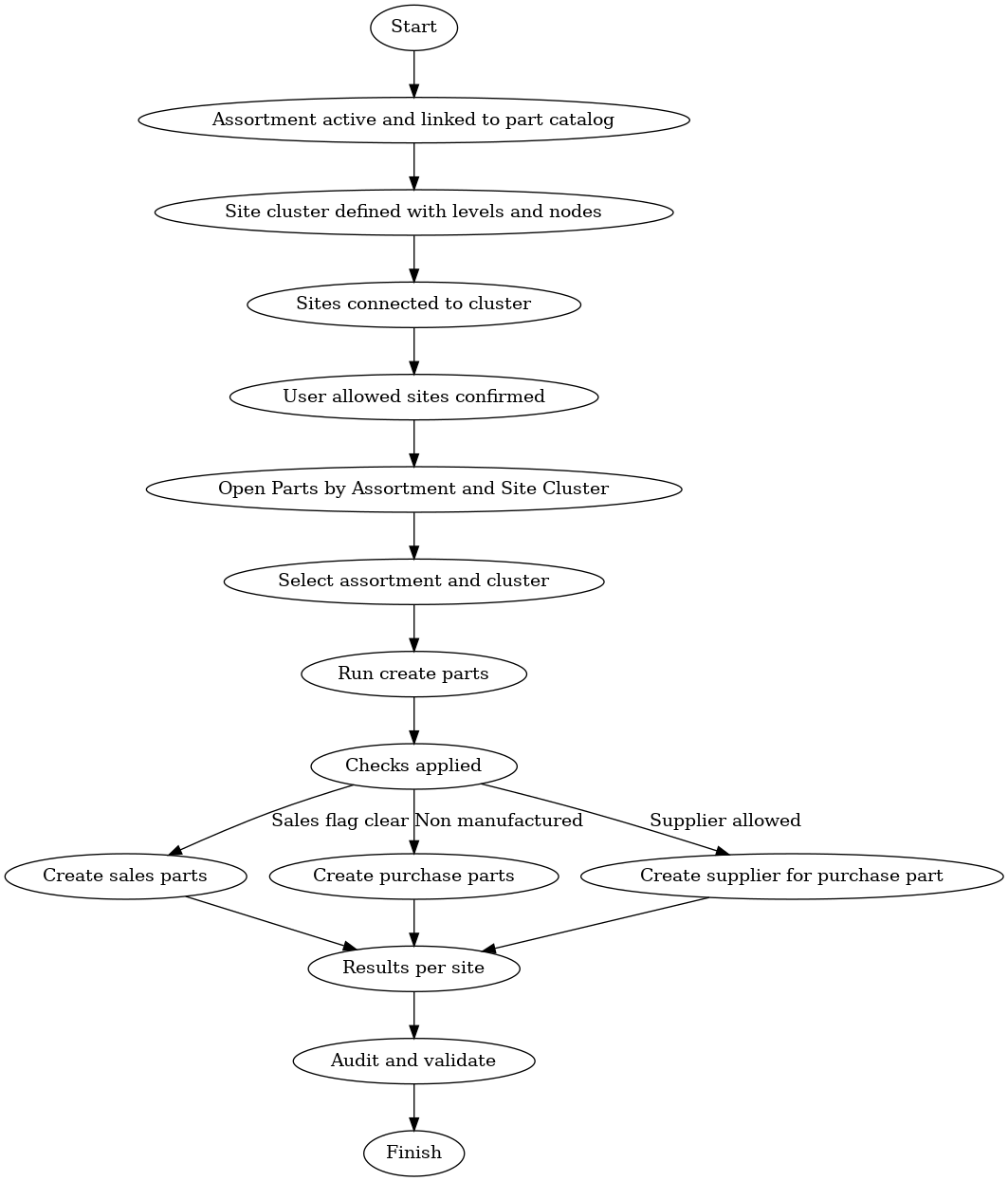
7. Run Mass Part Creation
-
Open Parts by Assortment and Site Cluster.
-
Select cluster and assortment, then run creation.
Automatic checks include:
-
Sales parts only created if the Do Not Create Sales Part flag is cleared.
-
Purchase parts created only for non-manufactured parts.
-
Supplier parts created if allowed by the flags.
Business Impact
Implementing site clusters delivers measurable value:
-
Speed: Shortens rollout cycles for new sites.
-
Consistency: Standardized part data across the enterprise.
-
Compliance: Enforced defaults for sourcing and supplier rules.
-
Cost savings: Fewer manual errors, less rework, and faster master data setup.
Example Hierarchy
A manufacturer opens new sites in Europe.
Cluster structure:

When the “Standard Bearings” assortment is applied to “Europe Operations,” all three plants receive identical part numbers, suppliers, and defaults — instantly.
Visual Guides
Diagram 1: Site Cluster Hierarchy
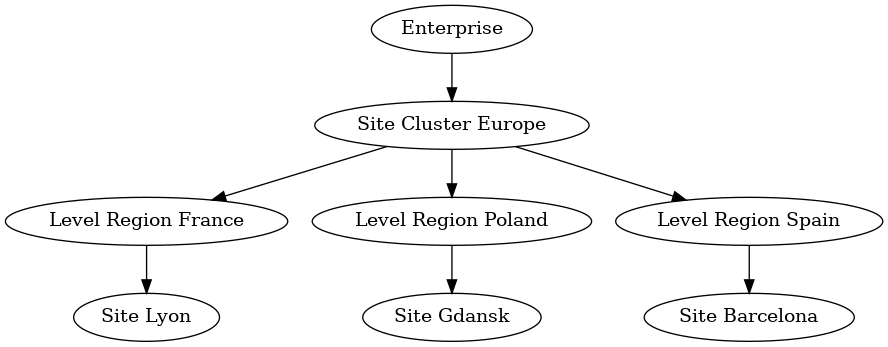
Diagram 2: Mass Part Creation Flow
Rollout Checklist
Pre-flight
-
Confirm part catalog and assortment are active
-
Define cluster naming standards
-
Confirm sites and user access
Build the Cluster
-
Create cluster root and levels
-
Add nodes for regions/countries
-
Connect sites to nodes
Defaults and Rules
-
Apply supplier and sourcing defaults
-
Set sales/purchase part flags
-
Record defaults in change log
Mass Creation Run
-
Test run first, review logs
-
Fix errors, rerun in production
-
Monitor execution results
Governance
-
Assign business and data owners
-
Weekly drift detection
-
Periodic audit of created parts
Validation After Go Live
-
Verify part attributes in sample sites
-
Check supplier links and pricing
-
Confirm warehouse and planning defaults
Rollback
-
Export created part IDs per site
-
Maintain rollback scripts
-
Keep backup references
Quick Reference for Training
Roles
-
Data steward runs assistants
-
Business lead approves defaults
-
IT monitors logs
KPIs
-
Time to enable a new site
-
Error rate during mass creation
-
Number of mismatched attributes found in audits
Conclusion
The site cluster is more than a configuration tool. It’s a strategic enabler that helps enterprises scale faster, enforce consistency, and govern master data effectively. Used properly, it turns what used to be tedious, error-prone setup work into a streamlined, controlled process that grows with the business.